js-munich-2020-spring
Calling APIs Lecture
What is an API?
From wikipedia:
An application programming interface (API) is a computing interface which defines interactions between multiple software intermediaries.
https://en.wikipedia.org/wiki/Application_programming_interface
In the web development context the term usually used with a more lose definition. More like:
remote servers that can be called/messaged
The remote server could do any number of things:
- Logged you in
- Track things like clicks
- Get more content for the user
- Send request on your behalf to another api for example to turn on a light
- Add things to your shopping cart
- Check if a product is in stock
- Send an Email
- …
What is async programming?
Most code is synchronous. It is executed line by line until it is done. Sort of like reading a book start to finish. Asynchronous programming as you may have guessed is why code is executed in an out of order fashion. Like reading a book by starting on the 45th page and reading for 5 pages. We need async coding for things like calling an api because the request might take a while and we don’t want our code to pause and wait for the response. The user might interact with the page in that time and we need the code to also respond to that.
In Javascript there are a few ways of async programming: Callbacks, Promises (bit older method) and Async functions (native support in modern browsers).
Callbacks we won’t cover in this lecture because we have done so extensively in pervious classes. Think about:
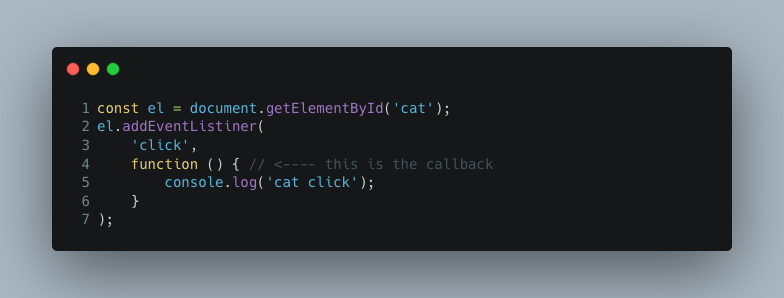
Going line by line the we can see on line 2 an function is registered as a click callback but it is not executed. This is an example of async programming because the program will continue on past this code and come back to it later.
Promises
Resource Links:
A promise is a special kind of object to help us deal with async code. We can chain thing together with .then, .catch, and .finally. We can also use promises to wrap
setTimeout Example:
function delayedLog(message, delaySec) {
    const delayedPromise =  new Promise(function(resolve, reject) {
        setTimeout(function() {
            if (message.length > 25) {
                return reject("message to long");
            }
            console.log(message);
            return resolve();
        }, delaySec);
    }).then(function() {
        console.log('message sent');
    });
}
Promise chain:
delayedLog('Hello world', 3000)
.then(function() {
    return delayedLog('I am a delayed message', 2000);
})
.then(function() {
    return delayedLog('Here is a really long messssssssssssssage', 5000);
})
.catch(function() {
    console.log('oops we have a problem');
})
.finally(function() {
    console.log('sent all messages');
});
In this example we create a promise by hand and use it to wrap the async setTimeout call back logic. We are then able to wait for all the message to log and then log “message sent”. This is a powerful concept we can use in many ways.
Promise.all()
A useful thing to do when working with promises is to run something once all promises have resolved. This can be used to model complex multistep logics.
Async Await
Resource Links:
Async functions are a modern way to work with promises that is closer to normal programming. They avoid a common problem of callback hell in an elegant way. One you understand promises async is just a bit more on top. They are functions that return promises and can await promises inside. They are sort of like Promise.all() in that the function resolves itself when all await statements inside resolve. In a lot of cases we can avoid using the promise syntax all together and just using async functions. The fetch function for example returns a promise so we can await it very easily.
Async function with error handling
async function main() {
    await delayedLog('Hello world', 300)
    await delayedLog('I am a delayed message', 2000);
    await delayedLog('Here is a really long messssssssssssssage', 5000);
    console.log('sent all messages');
}

main()
.catch(function() {
    console.log('oops there was a problem');
})
Fetch
Resource Links:
Fetch is the main way we call APIs from the browser. It is a javascript interface for making HTTP calls. At its most simple you give it a url and it does a GET http call to that url and returns a promise for the result. So the first argument is the url. The second argument is an optional object of options. It is with this object that you can make fetch do POST request on your behalf. Here is a basic example of wrapping fetch + login logic into a function.
const loginHost = "http://mycoolapi.com/login";

async function login(name) {
  const response = await fetch(loginHost, {
    method: 'POST',
    headers: {
      'Content-Type': 'application/json'
    },
    body: JSON.stringify({username: name})
  });
  const loginResult = await response.json();
  return loginResult.status && loginResult.status === "success";
}
Fetch gives up super powers! With it we can integrate with the outside world! Everything from turning lights on on the other side of the world to getting the latest sports scores.
Classwork
Lets go directly to playing with fetch(). Often times when working with APIs we need to call serval in order to preform some sort of operation like logging in. Today we are going to do something similar with a multi step math workflow. You are free to use promises, async functions, and callbacks as you with.
- Start by putting some status text on the page ex: loading…
- Get three random numbers from
/randomendpoint with a GET request- You’ll need to call it three times as it returns a single number each time
- Example resp:
{ "number": 752462 }- Full endpoint:
https://redi.travisshears.xyz/api/mathworkflow/v1/random
- Put a status update on the page ex: got numbers..
- Send these numbers to the
/totalendpoint via a POST request- Provide numbers in JSON string as the body of the request. Follow this structure with an array of numbers under the key “numbers”:
{ "numbers": [6235, 24662, 2388135359] }- Include header
'Content-Type': 'application/json'so the backend knows you are sending JSON - This will return a job id
- Example resp:
{ "jobID": "416af744-4cc5-4cbb-95fd-b76f1312af70" }- Full endpoint:
https://redi.travisshears.xyz/api/mathworkflow/v1/total
- Put a status update on the page ex: job processing…
- This is a very complex calculation so the job will take some time to process. Call
/job-result/:job_idrepetitively with the job id from the previous step until the job completes- Calculation takes 30sec
- Please be kind and limit your request to once per second. Perhaps using a sleep function like this:
function sleep(ms) { return new Promise(resolve => setTimeout(resolve, ms)); }- The result will of your job lives on the server for 500 seconds after that, poof it is gone
- Example resp:
{ "status": "processing" } ... { "status": "complete", "total": 54 }- full endpoint:
https://redi.travisshears.xyz/api/mathworkflow/v1/job-result/ceab79c4-6b05-490f-9327-53b188b155ae
- Render the answer to the page including the numbers ex: 1 + 1 + 1 = 3
- Done! That was a lot of fetch calls good work 🎉!
*if you have trouble with https/http endpoint try http